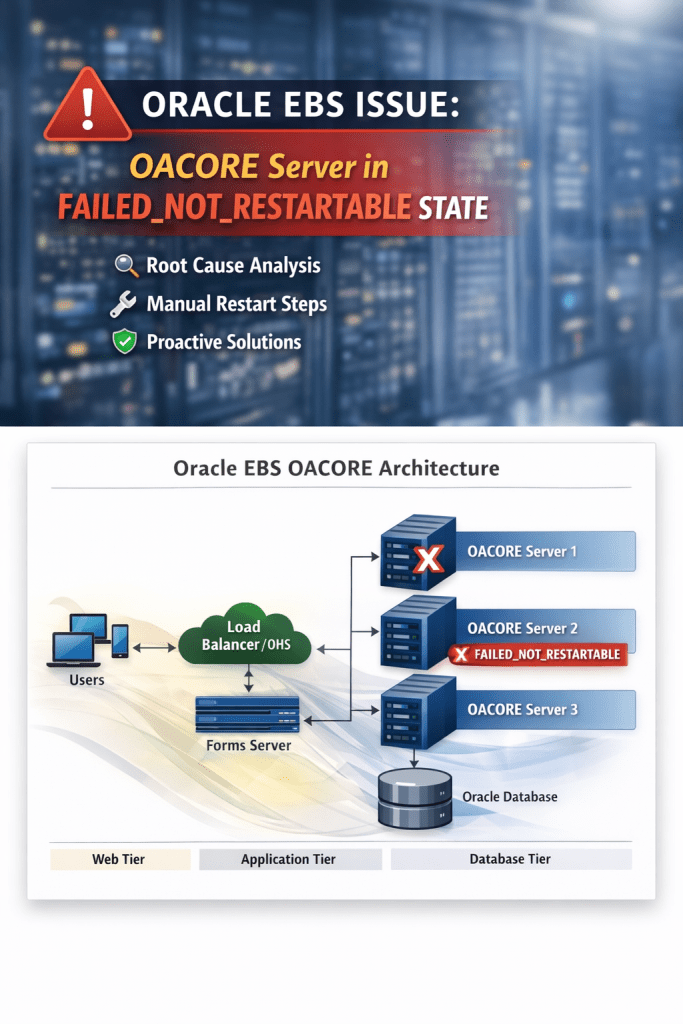
#In Oracle E-Business Suite (EBS) environments, application tier stability is critical to ensure seamless user experience. However, there are scenarios where managed servers behave unexpectedly and require manual intervention.
In this blog, I’ll walk through a real-world production issue where an OACORE managed server entered a FAILED_NOT_RESTARTABLE state, its impact, root cause analysis, and how it was resolved.
⚙️ Environment Details
Oracle E-Business Suite: R12.2.x
Application Tier: WebLogic Managed Servers
Component Impacted: OACORE Server (oacore_server1)
Environment Type: Production
# Problem Statement
We received an alert indicating:
oacore_server1 is in FAILED_NOT_RESTARTABLE state
Upon verification:
Server was running but in FAILED_NOT_RESTARTABLE
Node Manager could not auto-restart it
# Key Observations
OACORE server was in failed state
Application was still:
✅ Accessible
✅ Functional
Traffic handled by other OACORE servers
# Critical Insight
Application can remain functional even when one OACORE server is down.
✔️ Reason
Multi-OACORE architecture
Load balancing via OHS/Web tier
⚠️ Hidden Risk
Load redistribution increases pressure
Can lead to cascading failures
Reduced system resilience
# Detailed Analysis
Bulk concurrent requests were running
CPU load spiked significantly
Application tier became slow
OACORE failed to restart gracefully
# Root Cause Analysis (RCA)
High CPU utilization due to bulk concurrent requests + inactive Forms sessions led to JVM/resource exhaustion, pushing the managed server into FAILED_NOT_RESTARTABLE.
# Resolution
Bash
cd $ADMIN_SCRIPTS_HOME
./admanagedsrvctl.sh stop oacore_server1
./admanagedsrvctl.sh start oacore_server1
✅ Server came back to RUNNING
✅ Deployments active
✅ Application stable
#Preventive Measures
#Manage Concurrent Load
Avoid peak overload
Monitor long-running jobs
#Manage Inactive Forms Sessions
Configure session timeout
Monitor stale sessions
⚠️ Production Action (Important)
Inactive Forms sessions can be killed with proper approvals to reduce load and improve stability.
✔ Benefits:
Reduces CPU/memory usage
Frees JVM threads
Improves performance
✔ Ensure:
Approval obtained
Sessions are truly inactive
No active transactions impacted
# Identify Inactive Forms Sessions (SQL)
SQL
SELECT s.sid,
s.serial#,
s.username,
s.status,
s.program,
s.machine,
ROUND(s.last_call_et/3600,2) AS hours_inactive
FROM v$session s
WHERE s.status = ‘INACTIVE’
AND s.username = ‘APPS’
AND s.program LIKE ‘frmweb%’
AND s.last_call_et > 28800 — 8 hours
ORDER BY hours_inactive DESC;
#Generate Kill Commands (Use Carefully)
SQL
SELECT ‘ALTER SYSTEM KILL SESSION ”’||sid||’,’||serial#||”’ IMMEDIATE;’
FROM v$session
WHERE status=’INACTIVE’
AND username=’APPS’
AND program LIKE ‘frmweb%’
AND last_call_et > 28800;
⚠️ Execute only after validation and approvals
⏰ Automation – Monitor Every 8 Hours (Cron Job)
You can automate monitoring using a shell script.
# Sample Script: inactive_sessions.sh
#!/bin/bash
export ORACLE_SID=your_sid
export ORACLE_HOME=/path/to/oracle_home
export PATH=$ORACLE_HOME/bin:$PATH
sqlplus -s / as sysdba <<EOF
SET LINES 200
SET PAGES 200
SELECT COUNT(*) AS inactive_sessions
FROM v\\$session
WHERE status=’INACTIVE’
AND username=’APPS’
AND program LIKE ‘frmweb%’
AND last_call_et > 28800;
EXIT;
EOF
# Crontab Entry (Every 8 Hours)
0 */8 * * * /path/to/inactive_sessions.sh >> /tmp/inactive_sessions.log
✔ Helps track buildup
✔ Enables proactive cleanup
✔ Prevents OACORE instability
# DBA Quick Commands
top
uptime
ps -ef | grep oacore
SQL
SELECT request_id, phase_code, status_code
FROM fnd_concurrent_requests
WHERE phase_code = ‘R’;
# Key Takeaways
Application may appear healthy even when OACORE fails
FAILED_NOT_RESTARTABLE requires manual restart
Inactive sessions are silent resource consumers
Automation helps prevent incidents
#Conclusion
Frontend availability does not guarantee backend health.
This incident highlights the importance of:
Monitoring
Session management
Load control
Proactive DBA actions can prevent major outages and ensure system stability.
 Syed Anwar Ahmed – Oracle DBA Blog
Leave a comment